Visitor/Resident Map
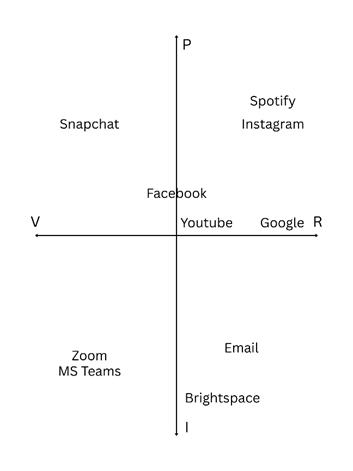
Your PLN – Inclusion & Community Engagement
My PLN is relatively diverse, as my digital network includes sources from various backgrounds, careers, and communities on multiple platforms. I try to remain updated with educators, professionals, creators, peers, and other organizations alike, who all share unique perspectives and experiences. Having access to a diverse PLN allows access to information from multiple viewpoints as opposed to staying within a singular perspective.
My PLN allows me to explore from a variety of diverse perspectives and expand my understanding of other unique experiences and opinions. Being exposed to individuals and organizations of various cultures, communities, and backgrounds also aids in the awareness of inclusion, accessibility, and communication by displaying how different experiences can shape the way people may think and interact online.
A learning outcome from my PLN is developing a better understanding of inclusion and empathy. Individuals can expand their PLN by networking with credible sources from different backgrounds, engaging in discussions, and connecting with communities outside of their usual interests. Exposure to diverse perspectives enables me to become more open-minded and understanding of others, and I ensure my exposure to diversity and inclusion by engaging with multiple different sources, consuming content from multiple viewpoints, and avoiding limiting myself to just one source or opinion.
How has your thinking about inclusion and PLN evolved?
My understanding of inclusion and PLNs has changed because I can now view social media beyond apps used primarily for entertainment. It can also be used to educate, build communities, and support positive discussions. A strong PLN should include diverse perspectives and experiences so individuals can learn from others with different viewpoints.
In a professional setting such as healthcare, inclusion is important as professionals work with people from many different backgrounds in which social media platforms can be utilized to spread inclusive, educational content and reach a wider audience. This helps to promote communication because it allows individuals to connect and share accessible information quickly. However, it can also create challenges because misinformation and negative interactions can easily be spread online. Because of this, professionals should be increasingly aware of maintaining a responsible and respectful digital blueprint.
An inclusive PLN amplifies the views from an array of sources instead of focusing solely on personal opinions, and sharing ideas from multiple credible perspectives helps to create a more supportive online environment. Having a public PLN also requires an understanding of employer expectations and social media presence, as employers can review social media accounts before hiring, so maintaining online professionalism is crucial. In addition, employers may be opinionated about an employee’s professionalism, communication skills, and character based on their digital identity.
The benefits of a diverse and inclusive PLN include gaining new perspectives, improving communication skills, and building stronger communities. Diverse networks also help to create a more respectful and inclusive online environment.
References
Clark, J., & Aufderheide, P. (2011) Media & Social Justice – Chapter 4: A New Vision for Public Media: Open, Dynamic, and Participatory.
Moore, S., & Schnellert, L. (2016). One Without the Other: Stories of Unity Through Diversity and Inclusion. Portage & Main Press.
Recent Comments